 TypeKey
Make AI text sound human
Paste text that reads stiff or robotic. TypeKey rewrites it in plain, natural wording, same meaning, same language.
Your text is sent to our server only to write the result. It isn't logged or saved.
How it works
Paste the text that sounds stiff or AI-written.
Tap Make it sound human.
Read the new version, change what doesn't sound like you, and copy it.
It uses plain everyday wording, varies the sentence length, uses contractions where they fit, and drops stiff phrasing, filler and clichés.
The meaning, the facts and the language of your text stay the same. Read it once before you send it: it's your text in the end.
Do more on your iPhone
- Humanize, Paraphrase, Fix grammar, Cover letter and Email in one app.
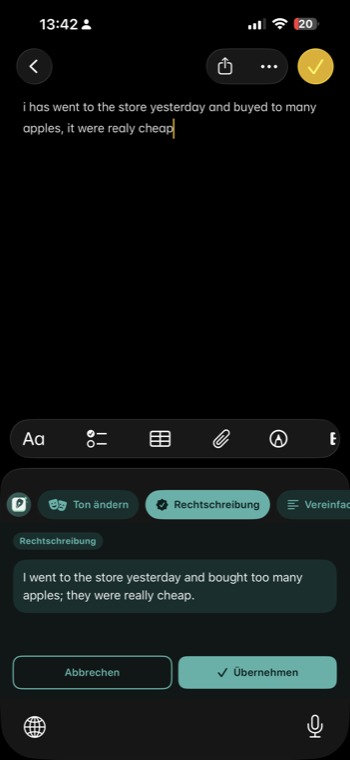
- The TypeKey keyboard brings Spell Check, Change Tone and Reply into your chats, emails and notes.
- Your text is sent only when you run a tool, and not stored on our server.

Free to download, with in-app purchases. Prices are shown in the App Store.
Questions
Is it free?
Yes: 2 results a day, no account, no sign-up. For more, the TypeKey app has Humanize with Premium.
What happens to my text?
It's sent to our server only to write the result; an AI service provider writes it. We don't log or save the text or the result.
Will it get my text past AI detectors?
That isn't what it's for. Humanize makes stiff, AI-sounding text read naturally. If you need to say you used AI somewhere, you still should.
Does it work in other languages?
Yes. The result stays in the language of your text.
How long can the text be?
Up to 1,000 characters here.
More you can do
Sounds like you, in your chats, emails and notes